
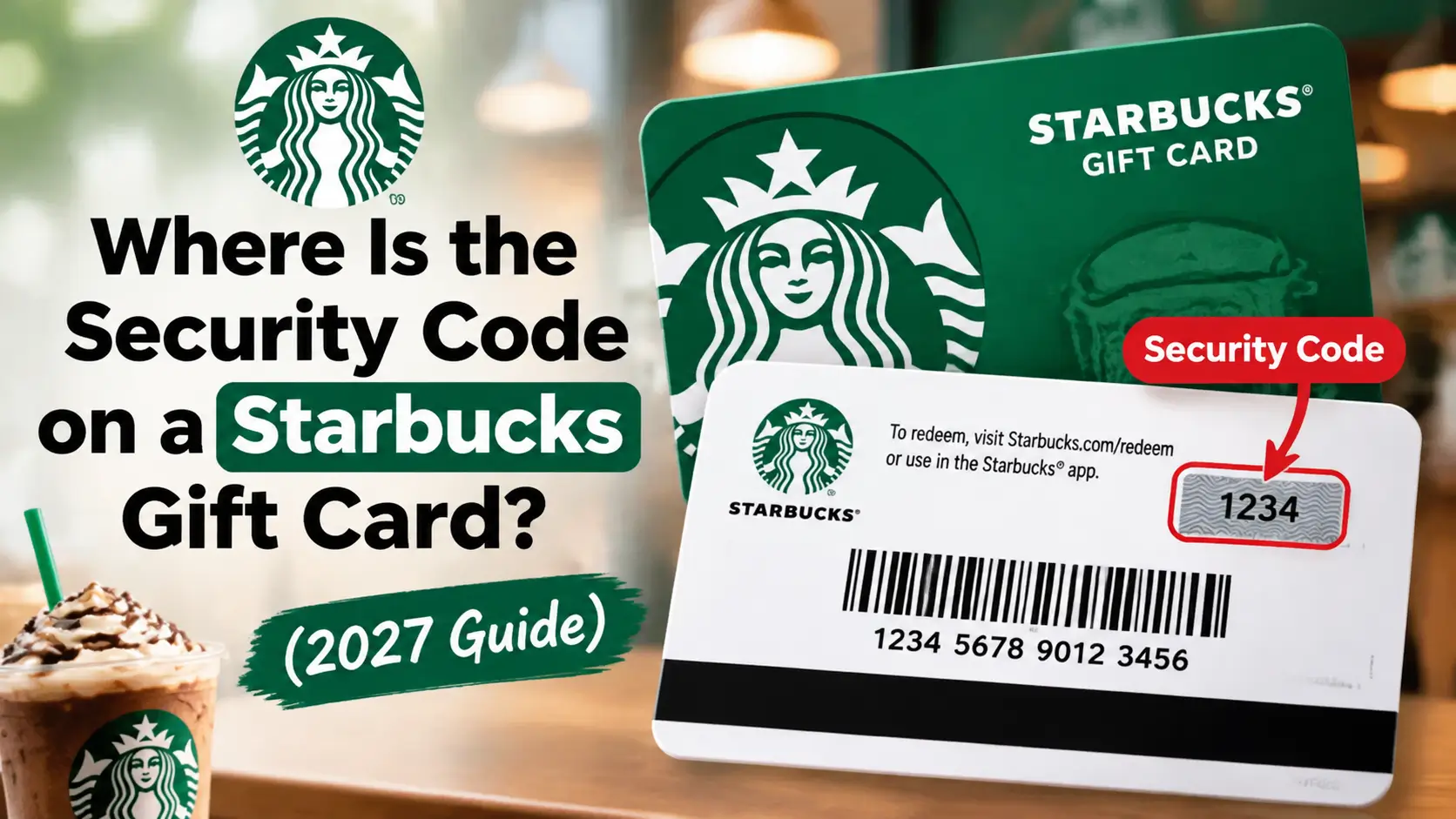
Where Is the Security Code on a Starbucks Gift Card? (2027 Guide)
You have a Starbucks gift card in your hand, the app is asking for a “security code,” and nothing on the front looks right. The code is not on the front at all. This guide shows exactly where it is on a physical card and on an eGift, what it is used for, and what to do if it is damaged.
Card number vs. security code: know which is which
Most mix-ups happen because a Starbucks card carries more than one set of numbers. On typical U.S. cards the layout looks like this:
| What it is | Digits | Where to find it | What it does |
|---|---|---|---|
| Card number | 16 | Back of the card, printed in plain sight; in the email for an eGift | Identifies your card |
| Security code | 8 | Under the silver scratch-off panel; below the card number in an eGift email | Proves you hold the card |
| Barcode | none to type | Back of the card or in the app | Scanned at the register to pay |
Heads up: formats can differ.Number lengths and labels can vary by country, card generation, and design. If your card shows different lengths, follow the instructions printed on the card itself.
How to find the security code on a physical gift card
- Turn the card over. The code is never on the front.
- Find the silver strip or panel beside the 16-digit card number.
- Scratch or peel gently with a coin or fingernail. Press lightly and work side to side.
- Read all 8 digits. Brush away the flakes so no digit stays hidden.
Tip:Scratch only when you are ready to add the card. Once the code is exposed, anyone who sees it can try to use your balance. Scratch hard and you may damage the digits, which is the most common reason people get stuck.
No scratch-off panel on your card?
Not every card has a silver panel. Some formats, such as cards that come in special sleeves or holders, show the 8-digit code printed directly on the back, often as a smaller number near the top-right corner close to the main card number. If you see two numbers on the back, the long 16-digit one is the card number and the shorter 8-digit one is the security code. Check the instructions printed on the card or sleeve if you are unsure.
How to find the security code on an eGift card
Digital cards have no scratch-off at all. Open the delivery email (or the message you received) and look for the card number. The security code is displayed directly below or beside the card number. If you bought the card through the Starbucks app, look in the app’s Cards section (your wallet) for the card details. If you cannot find the email, search your inbox, spam, and promotions folders for “Starbucks eGift,” or ask the sender to resend it.
Security code, CSC and PIN: same thing?
In most cases, yes. Starbucks screens and guides use several labels for the same hidden number: security code, card security code (CSC), and sometimes PIN. If a field asks for any of these on a gift card, enter the 8-digit number from under the scratch-off panel. It is not the three-digit code on a bank card, even though it plays a similar role.
What you need the security code for
- Adding the card to a Starbucks account in the app or online
- Checking your balance online, where both numbers are usually requested
- Reloading or managing the card from your account
You usually do not need it to pay in a store. The barista scans the card’s barcode, or you pay from your app after adding the card. Once the card is in your account, you can order from the menu without re-entering it. A quick balance check also works without any code: ask a barista at the register, or call Starbucks customer service at 1-800-782-7282.
How to add the card to your Starbucks account
- Open the Starbucks app and sign in to your free Starbucks Rewards account.
- Go to Cards and choose Add card. You can scan the card with your camera or type it in.
- Enter the 16-digit card number and the 8-digit security code.
- Confirm. The balance should show up in your account right away.
On a computer, sign in on the Starbucks website, open your cards section, and use the same two fields. If it is rejected, check for swapped digits, a scratch that left a digit unreadable, and extra spaces. Menu items such as a Caffè Latte or a refresher are paid from that balance, and the calorie calculator helps you plan an order before you spend it.
What if the code is scratched off, faded, or missing?
- Check under good light. A magnifier or a phone camera zoom can reveal faint digits.
- Keep the card and your receipt. Proof of purchase makes support much easier.
- Contact Starbucks customer service (1-800-782-7282 or via the contact page) and ask what they can do with the card number.
- For an eGift, ask the sender to forward the original email again.
Important:Do not pay a website, app, or “recovery service” to retrieve a code. Starbucks customer service is the right place to ask, and no one else needs your card details.
Gift card safety: protect your balance
- Never send a photo of the back of your card, and never read the code to a caller or message sender.
- Be suspicious of any request to pay with gift cards. A genuine business or government agency will not demand payment this way.
- Inspect a card before buying. If the scratch-off panel looks scratched, peeled, or resealed, choose a different card.
- Check your balance soon after buying or receiving a card, and add it to your account.
- Keep the receipt until you have confirmed the balance.
Where to use your balance
Once the card is loaded, browse the Starbucks menu with prices, find a nearby store, and confirm the opening hours. If dairy is a concern, our non-dairy drinks list shows what to order.
Frequently asked questions
Where is the security code on a Starbucks gift card?
On a physical card it is the 8-digit number under the silver scratch-off panel on the back, next to the 16-digit card number. On an eGift card it appears in the delivery email, below the card number.
How many digits is the Starbucks gift card security code?
On typical U.S. cards the security code is 8 digits and the card number is 16 digits. Layouts can vary by region and card design, so check the instructions printed on your card.
Is the security code the same as the card number?
No. The card number identifies the card. The security code is a separate number that proves you hold it.
What if my card has no scratch-off panel?
Look for a smaller 8-digit number printed on the back, often near the top-right corner next to the main card number. If you still cannot tell which number is which, check the card’s printed instructions or contact Starbucks customer service.
Do I need the security code to pay in a Starbucks store?
Normally not. The barista scans the card barcode. The code is mainly needed to add the card to an account or manage it online.
Is the security code the same as the PIN?
In most cases yes. Depending on where you enter it, the same number may be labelled security code, card security code, or PIN.
What if the scratch-off code is damaged or missing?
Contact Starbucks customer service with the card and your proof of purchase. Do not pay anyone else to recover the code.
Do Starbucks gift cards expire?
Under Starbucks’ U.S. card terms, balances do not expire. Terms can differ by country and card type, so confirm on your own card or with Starbucks.
Final thoughts
The security code on a Starbucks gift card is the 8-digit number under the scratch-off panel on the back, or in the email for an eGift. Scratch gently, keep it private, and add the card to your account so the balance is protected and easy to use.
This article is for general information only. Card formats, screens, and policies change, so confirm details in the Starbucks app or with Starbucks customer service. This site is not affiliated with Starbucks.